








‘Targeting feature flags on devices, groups, pages, machines, and more’
Contents
To decide what value to return, PostHog’s feature flag service uses a flag key and an entity. Which entity to use is up to you, and these don’t necessarily need to be users – you can also target devices, organizations, pages, machines, and more.
This tutorial shows you how to target these non-user entities in your use of feature flags.
Targeting by device
By default, feature flags match by user, meaning the flag is evaluated based on the user’s distinct ID. This works well for in-app features where users are logged in.
For flags that target anonymous users — such as landing page experiments, onboarding flows, or signup forms — matching by device is often a better choice. When you match by device, PostHog uses the device ID (rather than the user’s distinct ID) to determine the flag value. This ensures a consistent experience on the device, even after the user logs in.
To target by device, change the Match by value under Release conditions to Device when creating or editing your feature flag.
When to use device targeting
- Anonymous user experiences: If a user sees a new signup flow before logging in, matching by device ensures they continue seeing the same variant after they create an account and log in.
- Pre-authentication features: Landing pages, pricing pages, or other features shown before a user is identified.
- Experiments on anonymous traffic: When running A/B tests on pages visited by both anonymous and logged-in users, device targeting prevents users from switching variants mid-experiment.
How it differs from user targeting
| Match by user | Match by device | |
|---|---|---|
| Evaluation basis | User’s distinct ID | Device ID |
| Best for | Logged-in, identified users | Anonymous or pre-login experiences |
| Consistent across login | May change if distinct ID changes | Stays consistent on the same device |
| Cross-device consistency | Yes, if user is identified | No, each device is evaluated independently |
Note: Device targeting is a simpler alternative to persisting flags across authentication steps. If your flag only needs to be consistent on the same device through the login flow, device targeting achieves this without the performance tradeoffs of flag persistence.
Targeting groups, teams, or organizations
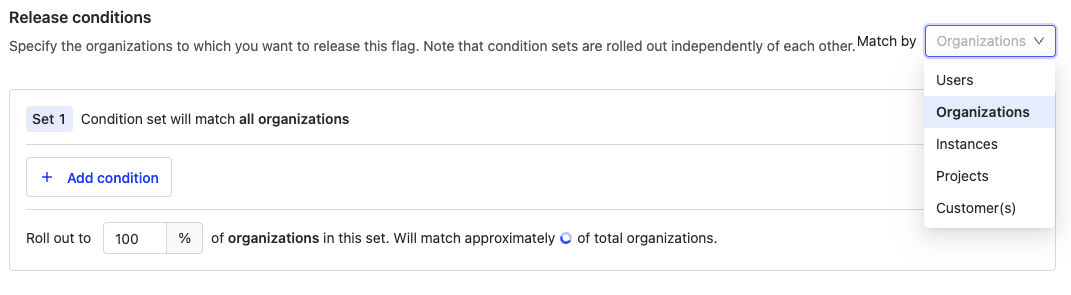
If you enabled group analytics and set up group idenitifcation, targeting by groups, teams, or organizations is easy. When creating your feature flag, change the "Match by" value under "Release conditions" your group type name, add any conditions you want, and roll out the flag.
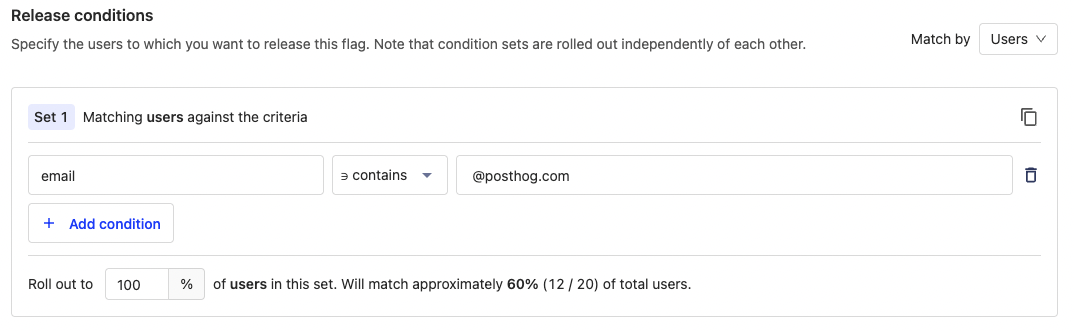
Property or cohort filter
Another way to target an organization or team is to use the email or similar repeated identifier of a user. This enables you to filter for groups without using group analytics. Similarly, you can create a cohort for the organization, then use that as a condition.
Targeting pages
Another target you might want is pages. For example, to ensure components are consistent across a set of pages, test a new pricing page, or customize a page's experience based on how many times it has been viewed.
Payloads
You can use feature flag payloads to customize the experience depending on the page. For example, if you want a button to change colors depending on the page URL. Payloads lets you set multiple values on one feature flag which you can evaluate and use in your app.
To do this, create your flag with a payload such as:
In your app, get feature flag payloads, write logic to check the page URL, and use a combination of the page URL and flag payload to adjust your button. For a Next.js component, this would look like this:
Cohort
If instead, you want to target users who visited a page repeatedly, you can create and use a static cohort. For example, if you wanted to target a flag to show a new pricing page for people who have visited the pricing page repeatedly.
- Create a cohort for people who had multiple pageview events
- Duplicate as a static cohort.
- Use the static cohort as a condition for your feature flag
Why can’t I use a behavioral cohort directly? Calculating a behavioral (based on events) cohorts is slow. Feature flags care about speed. Adding behavioral cohorts to flag evaluation would significantly slow them down. Read a full explanation in our docs.
Targeting services, machines, devices, applications
Another entity you might want to target is services, machines, or devices. For example, you might want to roll out a canary release to some of your servers or activate a flag in one region but not another.
Custom user value
A user in PostHog is just a distinct ID string connected to events. Although on the frontend, it is generated and connected to a real user's sessions, on the backend it could represent anything. This means you can use service, machine, device, or application IDs as the distinct ID and feature flags will still work with them this way.
To do this, start by capturing an event with the entity ID (like server ID).
Next, create a feature flag and roll it out to match the properties of your desired servers. In this case, server_id equals canada-cloud-1.
Finally, add your feature flag call using your server ID:
Now, you can target your server with feature flags. You can use a similar workflow with services, machines, or devices as well as any of our other backend SDKs or even our API.
One-time property value
A common pattern we use for many of our site apps is show a feature, set a property on the user once the "business code" executes, and check for that property to not show again. This pattern is useful if you want interactions with features or services to only happen once.
📖 Read a full implementation of this in "How to set up one-time feature flags."
To do this, create a flag where is_first_interaction is not false.
Next, implement the flag and add a capture call after the flag to flip the is_first_interaction property.
The flag now returns false meaning the user gets a different experience on all subsequent interactions.